
TL;DR: If you’re wondering how to optimize a WordPress website for search engines, start with the basics: make your site crawlable, your pages useful, your URLs clear, and your site fast. Then keep checking what works instead of treating SEO like a one-time chore.
San Diego is full of businesses fighting for the same few clicks. A customer searches for a service, sees a page of results, and makes a choice. Maybe they click the first result. Maybe the second. How often do they scroll to page five?
That is why optimizing a WordPress website for search engines matters. WordPress gives you a strong starting point, but it does not magically put your business in front of the right people. Google still needs to crawl your pages, understand them, and decide that they deserve attention.
At Tower 25 San Diego, we look at SEO as more than keywords. Is the site easy to use? Can Google find every important page? Does the content answer a real question? Does the site load quickly on a phone? And, most important, does all that work help turn a searcher into a customer?
How Do WordPress SEO Tips Work?
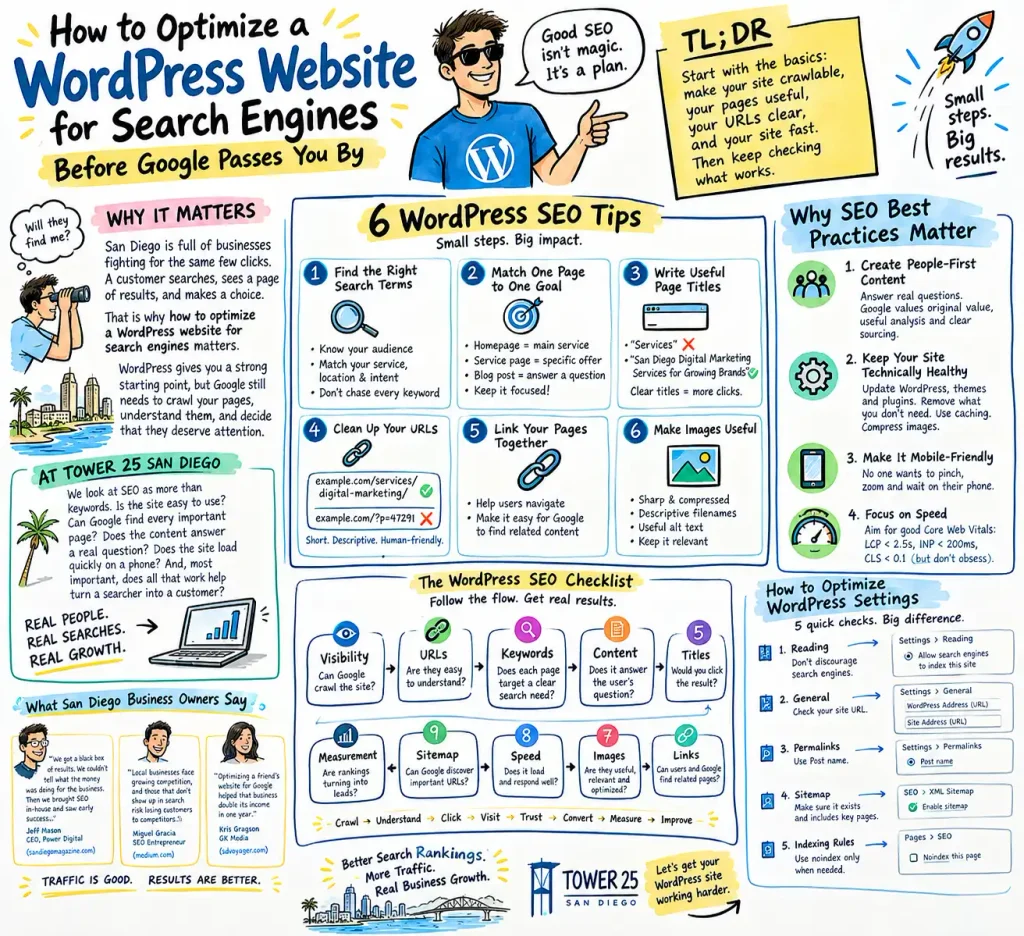
The best WordPress SEO optimization tips are not mysterious. They are a series of small jobs that work together.
1. Find the Right Search Terms
Start with what your customers type into Google. A San Diego dentist might target “dentist in San Diego,” while a restaurant might target “best brunch in North Park.”
Do not chase every keyword you find. Pick terms that match your service, location, and customer intent.
2. Match One Page to One Goal
Give every important page a clear job.
Your homepage can target your main service. A service page can target a specific offering. A blog post can answer a narrow question.
Why does this matter? Because a page that tries to answer everything often answers nothing well.
3. Write Useful Page Titles
Your title should tell people exactly what they will get. Google says clear, unique titles help users understand search results, and Google may use your title element and page headings when creating the title link.
Instead of:
Services
Try:
San Diego Digital Marketing Services for Growing Brands
See the difference?
4. Clean Up Your URLs
Keep URLs short and descriptive. WordPress recommends logical permalink structures that humans and search engines can understand.
example.com/services/digital-marketing/
is easier to understand than:
example.com/?p=47291
5. Link Your Pages Together
Do you have a strong service page buried three clicks deep? Link to it from related blog posts and other useful pages.
Internal links help visitors move around your site and help search engines discover and understand related content.
6. Make Images Useful
Use sharp images, sensible file sizes, descriptive filenames, and useful alt text. Google also recommends placing high-quality images near relevant text so people and search engines can understand what the image represents.
Why Do SEO Best Practices Matter?
The WordPress SEO best practices that matter most are surprisingly simple.
First, create people-first content. Do not write 2,000 words because an SEO tool says 2,000 words is better. If the answer needs 700 words, write 700 good words. Google specifically asks whether content offers original value, useful analysis, clear sourcing, and a satisfying answer.
Second, make your site technically healthy. Keep WordPress, themes, and plugins updated. Remove plugins you do not need. Use caching. Compress large images. WordPress notes that themes, plugins, hosting, image sizes, and configuration can all affect performance.
Third, pay attention to mobile users. A beautiful desktop site means little if someone searching from a phone has to pinch, zoom, wait, and hunt for the contact button.
And then there is speed.
Google’s Core Web Vitals focus on loading, responsiveness, and visual stability. The current “good” targets include LCP within 2.5 seconds, INP below 200 milliseconds, and CLS below 0.1.
But do not become obsessed with getting a perfect score. Google itself says good Core Web Vitals do not guarantee top rankings. They are one part of the larger picture.
What San Diego Business Owners Are Seeing
This is not just SEO theory.
In a recent San Diego Magazine feature, Power Digital CEO Jeff Mason explained how the company’s founder first hired an SEO agency for a janitorial business. The problem? The owner got a “black box of results” and could not tell what the money was doing for the business. The company later brought SEO in-house and saw early success.
That lesson matters. Traffic alone is not enough. You need to know what that traffic does.
San Diego SEO entrepreneur Miguel Gracia made a similar point in 2025, arguing that local businesses face growing competition and that businesses that do not show up in search risk losing customers to competitors.
And Kris Gragson of GK Media shared an even more concrete example. He said optimizing a friend’s website for Google helped that business double its income in one year.
Those stories change the question.
It is not simply, “How do I rank?”
It is, “What happens after I rank?”
That is the question San Diego businesses should care about.
How Can WordPress Ranking Improve?
If you want to improve your WordPress website ranking, stop looking for one magic plugin.
There isn’t one.
Think about the entire customer journey. Someone searches. They see your result. They click. They land on a page. They decide whether they trust you. Then they either call, submit a form, visit your location, or leave.
Every step matters.
A recent interview with Darci Daneshvari of San Diego’s Explore Digital offers another useful perspective. She started in SEO and described working through the major changes that came with Google’s Panda and Penguin updates. Her career eventually led her to build her own agency.
Her story is a reminder that SEO changes. What worked years ago may not be enough now.
So, refresh old content. Fix broken links. Add missing internal links. Improve weak pages. Build useful local content. Earn credible mentions and links. Make your services clear.
And measure business results, not just rankings.
A page moving from position 14 to position 7 sounds exciting. But did calls increase? Did leads increase? Did sales increase?
If not, what exactly did you win?
How Should WordPress SEO Settings Work?
Your WordPress SEO settings deserve attention because one small mistake can create a very big problem.
Step 1 — Check Search Visibility
Go to Settings → Reading.
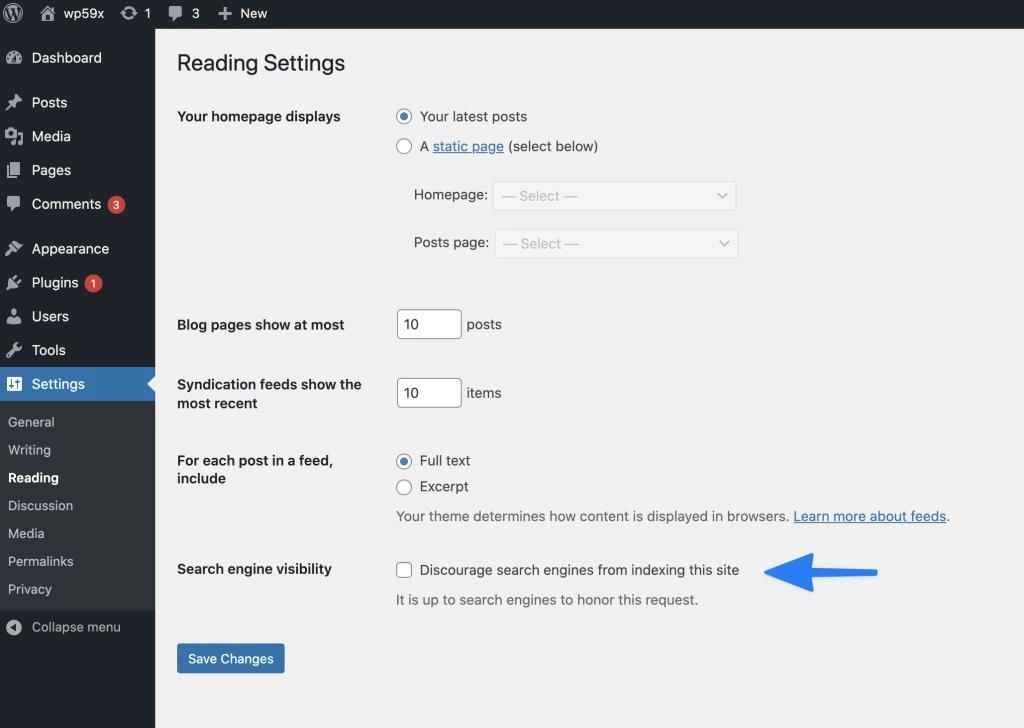
Make sure you have not selected “Discourage search engines from indexing this site” on a live website. That setting can prevent Google from properly indexing your site.
Step 2 — Check Your Site URL
Go to Settings → General.
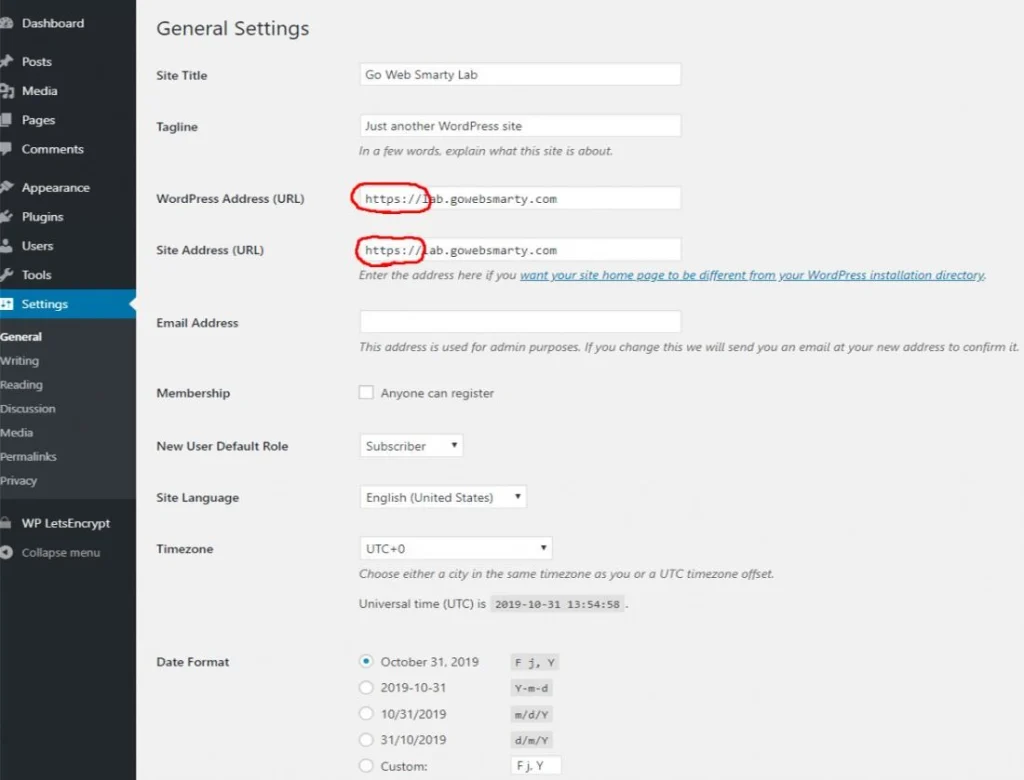
Check the WordPress Address (URL) and Site Address (URL). Make sure the preferred version of your domain is correct and consistent. WordPress lists both settings on its General Settings screen.
Step 3 — Set Clean Permalinks
Go to Settings → Permalinks and choose a clear structure such as Post name for most standard sites.
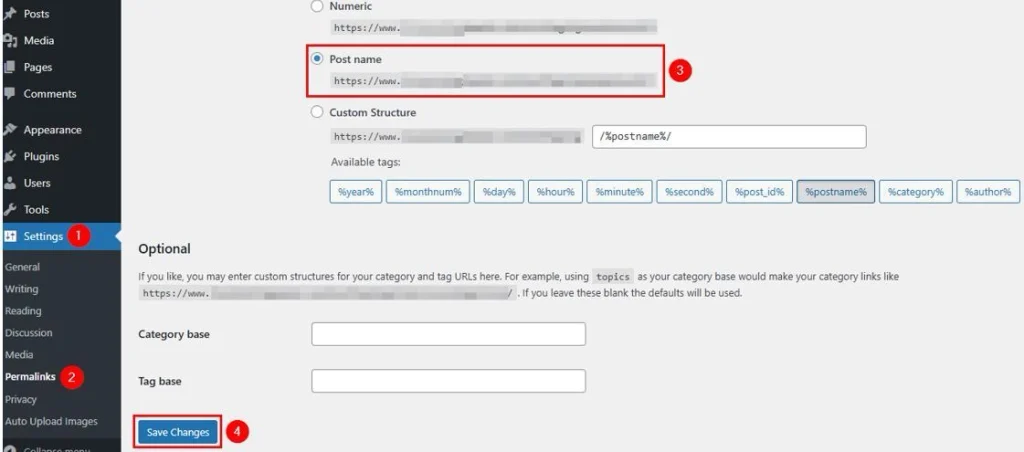
WordPress explains that permalinks create the permanent URLs for your posts and pages and can make links easier for people and search engines to understand.
Step 4 — Check Your Sitemap
Your SEO plugin may generate an XML sitemap automatically. Check that it exists and includes the pages you want Google to discover.
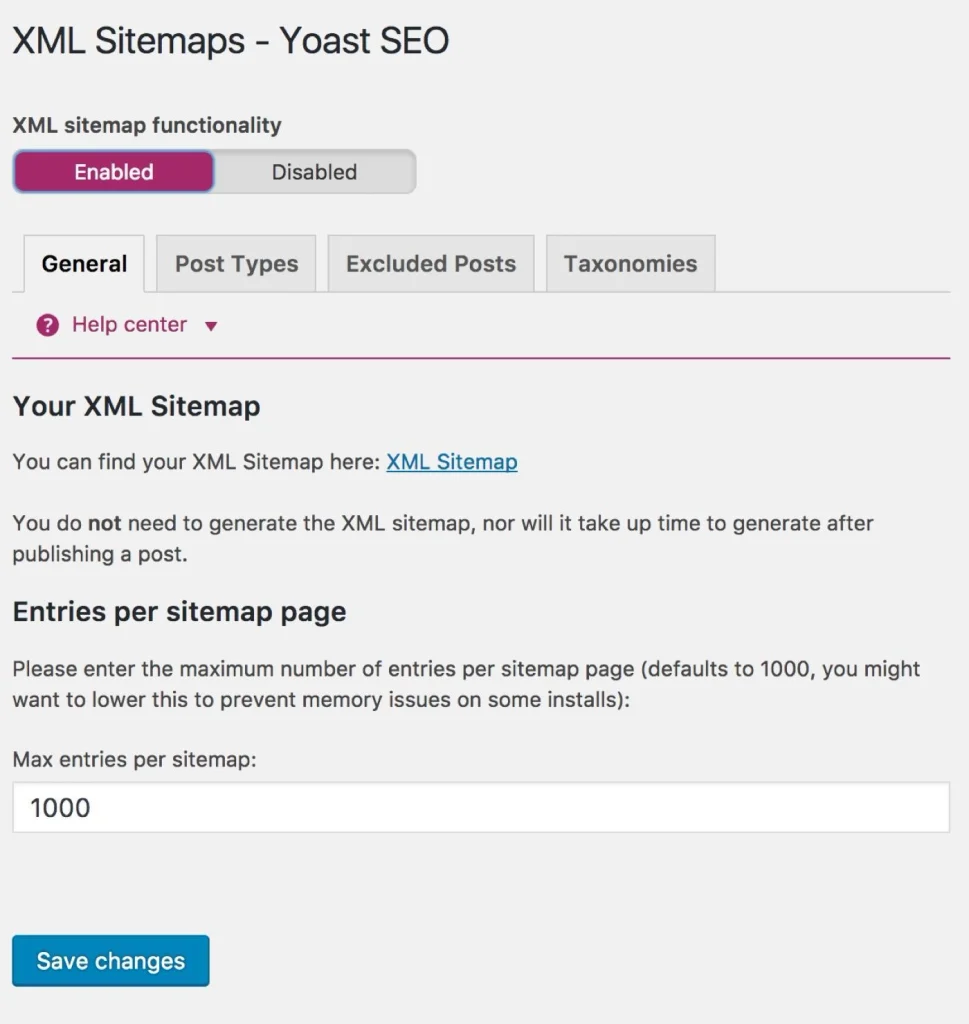
Google says sitemaps help it discover new and updated URLs, and WordPress and other CMS platforms can generate them automatically.
Step 5 — Review Indexing Rules
Do not unthinkably set pages to noindex. Use it for content that genuinely should not appear in search.
Google explains that noindex removes a page from Google Search, but Google must be able to crawl the page to see that instruction.
How Does Your SEO Checklist Flow?
Here is the WordPress website SEO checklist in the order we would use it:
| Stage | Check | What to ask |
| 1 | Visibility | Can Google crawl the site? |
| 2 | URLs | Are pages easy to understand? |
| 3 | Keywords | Does each page target a clear search need? |
| 4 | Content | Does it answer the user’s question? |
| 5 | Titles | Would you click the result? |
| 6 | Links | Can users and Google find related pages? |
| 7 | Images | Are images useful, relevant, and optimized? |
| 8 | Speed | Does the site load and respond well? |
| 9 | Sitemap | Can Google discover important URLs? |
| 10 | Measurement | Are rankings turning into leads? |
The flow is simple:
Crawl → Understand → Click → Visit → Trust → Convert → Measure → Improve
That is the real SEO loop.
And it explains why throwing keywords onto a homepage rarely fixes a weak website.
How Do WordPress SEO FAQs Help?
How long does WordPress SEO take to work?
SEO rarely produces meaningful results overnight. Google may take days or weeks to recrawl changes, while competitive keywords can take much longer to move.
Does WordPress automatically do SEO?
WordPress gives you many SEO-friendly features, but it does not handle your entire SEO strategy for you. You still need strong content, useful page titles, clean URLs, internal links, good performance, and proper indexing.
What is the best permalink structure for SEO?
For many standard WordPress sites, the Post name structure keeps URLs simple and descriptive. If your existing site already has another structure, do not change it casually because URL changes can create broken links and redirect work.
Should every WordPress page be indexed?
No. Your important pages should generally be available to search engines, while thin, duplicate, private, or otherwise unnecessary pages may need different indexing treatment. Google provides noindex specifically for pages you do not want appearing in search.
Do WordPress plugins improve SEO?
They can make technical SEO much easier, especially for sitemaps, titles, descriptions, redirects, and indexing controls. But a plugin cannot replace useful content, a strong site structure, or a good customer experience.
Do Core Web Vitals affect WordPress rankings?
Core Web Vitals are part of Google’s page-experience signals, so they matter. But Google also makes clear that strong Core Web Vitals alone do not guarantee high rankings.
How can I measure WordPress SEO success?
Look beyond rankings. Track organic clicks, impressions, conversions, calls, form submissions, qualified leads, and revenue. A number-one ranking that produces no customers is not much of a victory.
Key Takeaways
- SEO starts with access: Make sure Google can crawl and index your important WordPress pages.
- Useful content beats keyword stuffing: Answer real questions in clear, original language.
- Technical details matter: Check URLs, sitemaps, internal links, images, mobile usability, and Core Web Vitals.
- Measure business outcomes: Rankings are useful, but leads, calls, conversions, and revenue tell the bigger story.
- Keep improving: SEO is not a switch you turn on once. It is a cycle of testing, learning, fixing, and growing.
Make Your WordPress Site Earn Its Place
So, how do you optimize a WordPress website for search engines? Start with the boring stuff. Make sure Google can crawl the site. Make your pages useful. Clean up the URLs. Improve speed. Connect related pages. Check your settings. Then keep learning from the data.
That may not sound glamorous. But it works.
At Tower 25 San Diego, we believe SEO should lead somewhere. More visibility should create more attention. More attention should create more qualified traffic. And that traffic should give your business a real chance to grow.
Want to find out what is holding your WordPress site back? Talk to Tower 25 San Diego and turn your search traffic into something that matters.